
Admin: Create Key
Create and manage API Keys for authentication and access control
API Keys are credentials for calling the AI Gateway API. Keep them secure.
Prerequisites before creating an API Key:
- Complete Token supplier configuration first.Token Supplier Configuration
- Configure and enable at least one domain in Domain Management.Domain Management
Key Management List
Enter Key Management Page
Go to "Gateway Management" → "Key Management".
Statistics Overview
Statistics cards showing Key status overview:
Active Keys
Active Keys
Normal Keys
Normal Keys
Quota Warning Keys
Quota Warning Keys
Disabled Keys
Disabled Keys
Key Management List
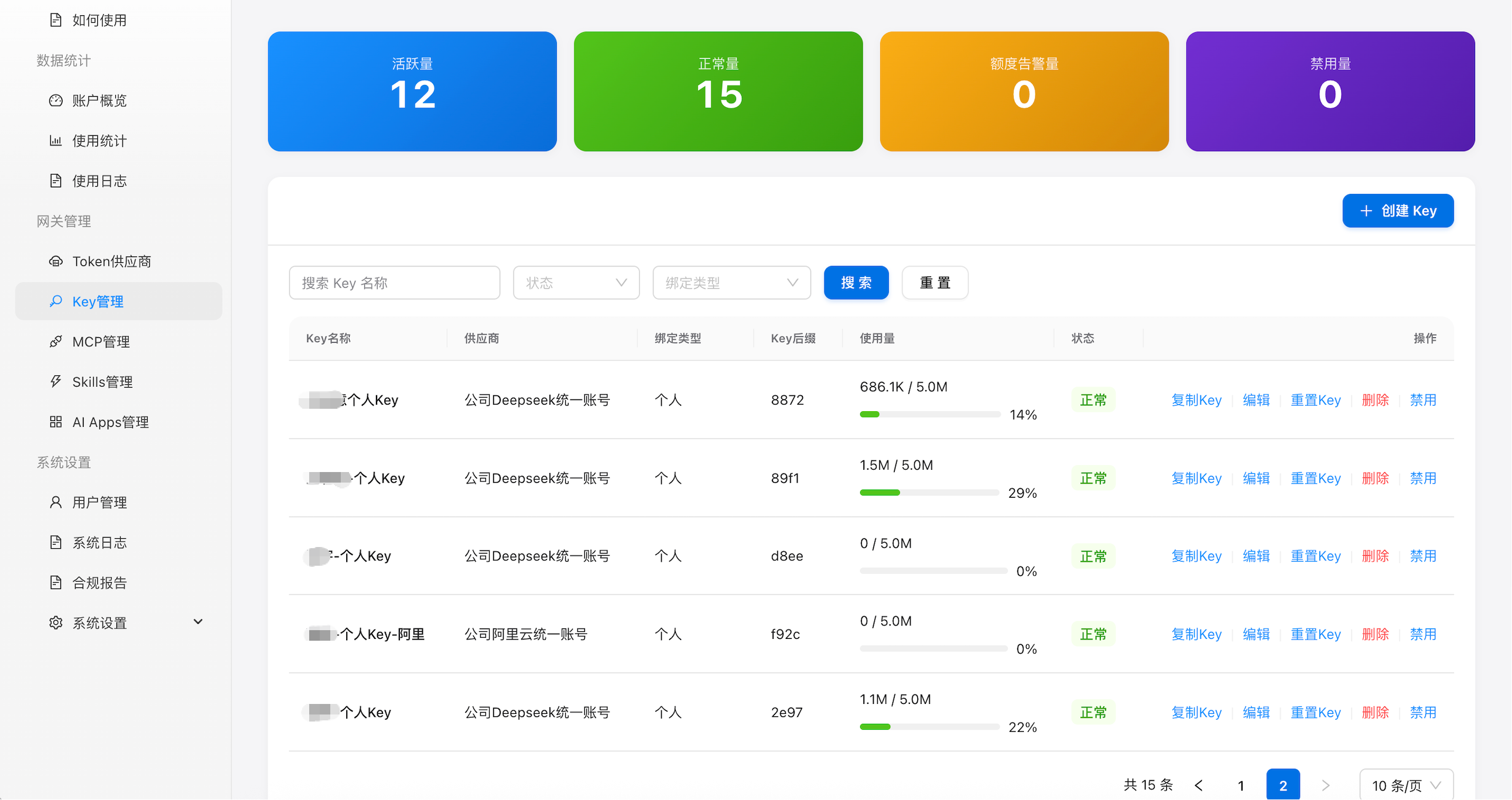
Figure 3: Key management list
List Field Description
| Field | Description |
|---|---|
| Key Name | Custom Key name with masked prefix and last 4 characters |
| Supplier | Token supplier(s) bound to this Key |
| Bind Type | "Personal" or "App" |
| Key Suffix | Last 4 characters for identification |
| Usage | Today's usage / daily quota with percentage bar |
| Status | Green "Active", Gray "Disabled", Red "Expired" |
| Actions | Copy Key, Edit, Reset Key, Delete, Enable/Disable |
Search & Filter
- Name search: enter Key name keyword
- Status filter: "Active" or "Disabled"
- Bind type filter: "User" or "App"
- Click "Reset" to clear all filters
Create API Key
Open Create Form
Click the "Create Key" button.
Fill Key Basic Info
The form includes the following fields:
| Field | Required | Description |
|---|---|---|
| Key Name | Yes | Custom name to distinguish different Keys |
| Validity | Yes | Set the expiration date for the Key |
| Supplier Binding | Yes | Select one or more Token suppliers that this Key can access |
| Bind Type | Yes | "Personal" or "App". Personal Keys are bound to users, App Keys to applications |
Personal Mode — Bind User Info
Each user can only have one Personal Key.
| Field | Required | Description |
|---|---|---|
| Name | Yes | User's real name |
| Yes | Email address to receive the plaintext Key |
App Mode — Advanced Configuration
Richer access control configurations are available.
- Statistics by User: Track usage per end user independently. Requires JWT user info in requests
- Allowed Domains: Set email domain allowlist for this Key. Only matching domains can access
- Daily Token Quota: Daily Token usage limit per end user
- Monthly Token Quota: Monthly Token usage limit per end user
Configure Rate Control
Both modes require rate control parameters.
| Field | Required | Description |
|---|---|---|
| RPM | Yes | Max API requests per minute for this Key |
| TPM | Yes | Max Token consumption per minute for this Key, in M (millions) |
Confirm Creation
After filling in all fields, click "Submit".
Open Create Form
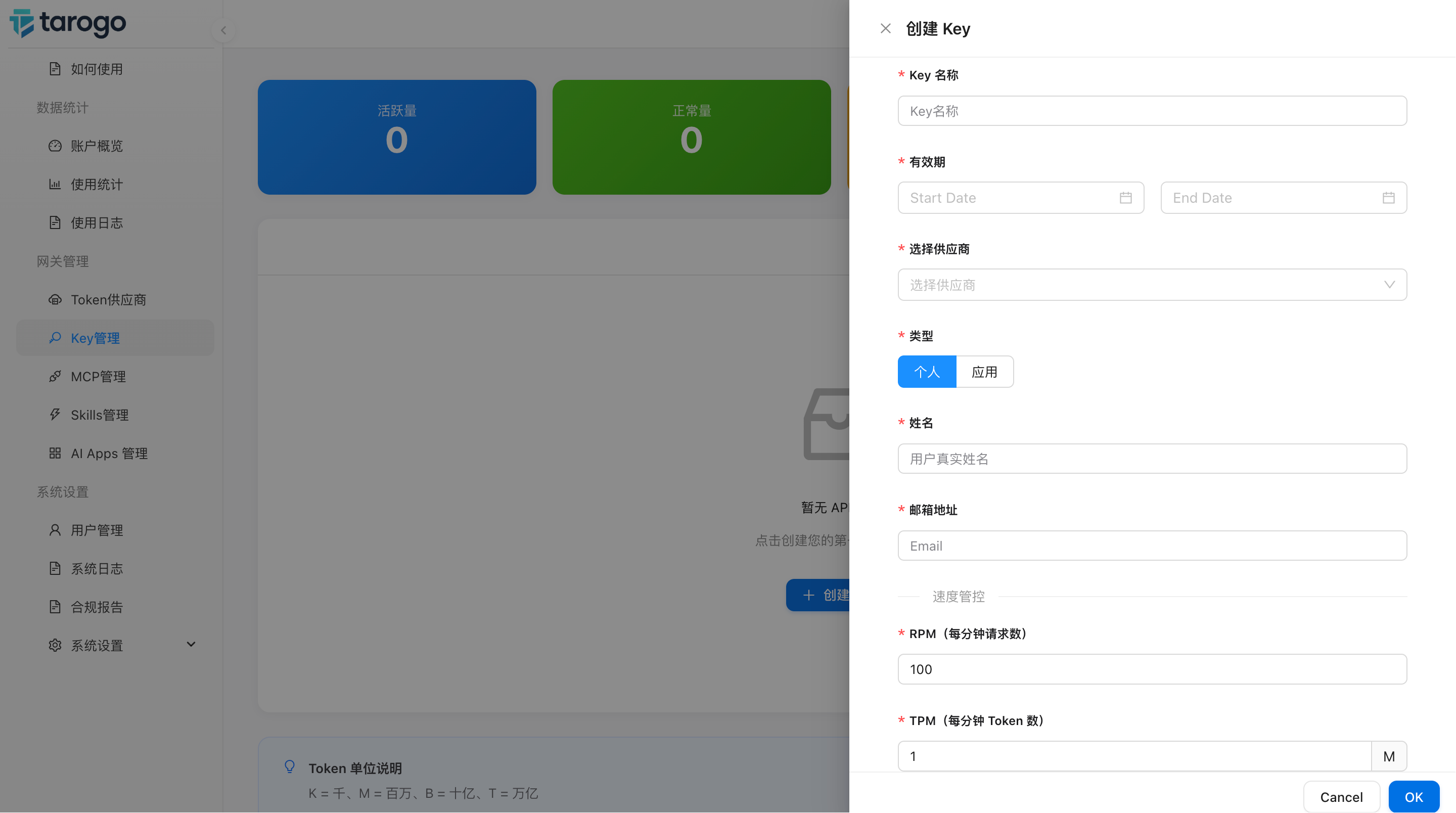
Figure 4: Create Key form (Personal mode)
Key Management Operations
Perform the following operations on each API Key:
Copy Key
Copy the plaintext Key to the clipboard.
Edit
Modify the Key's name, validity, supplier, RPM, TPM, etc.
Reset Key
Generate a new Key when the current one may be compromised.
Enable / Disable
Disable or enable a Key at any time.
Delete
Permanently delete the Key. This action cannot be undone.