
Publish Skill
Admins package prompt templates, function tools, and workflows into standardized Skills and publish them to the market for team members to use.
Who Can Publish
Publishing and managing Skills requires tenant_admin or system_admin privileges. Regular team members can only browse and use published Skills.
Publishing Steps
Prepare the Skill Package
- Package your Skill content into a .zip file. The package must include a skill.md file as the manifest definition.
- skill.md describes the Skill's name, functionality, input/output parameters, etc. The AI Agent parses this file to understand how to call the Skill.
- Remove unnecessary files (e.g., .DS_Store, node_modules) before packaging to reduce file size.
Enter the Skill Management Page
- Log in as a tenant_admin, select "Skills Management" from the left menu to enter the skill list page.
- If the list is empty, the page shows an empty-state guide. Click the "Add Skill" button to start creating.
- When skills exist, the list displays skill name, version, status (enabled/disabled), download count, and creation time in a table format.
Fill in Basic Information
- Fill in the skill name (required), version (default 1.0.0), description, author, and other information in the Drawer form.
- The skillCode is auto-generated from the name in kebab-case format (e.g., my-awesome-skill).
- Add tags for classification. Tags can be selected from the preset library or created by typing and pressing Enter.
- Preset tags are managed by tenant_admin in "System Settings → Other Configurations → Skill Tags". Custom tags are created on-the-fly as needed.
- Click the "Icon" selector to choose an icon for the Skill from the pop-up panel. The icon is displayed on skill cards and detail pages for easier identification.
- Fill in the "Version Description" to describe the main changes in this version, such as new features or fixed issues. The description is recorded in version history for future reference.
Upload the Skill Package
- Drag or click to upload the .zip skill package in the file upload area at the bottom of the form. The system automatically checks if skill.md is included.
- If the zip package is missing skill.md, an error is shown and the upload is blocked. Upon validation, the file is uploaded and a download link is generated.
- The system auto-ignores __MACOSX directories and .DS_Store files generated on macOS.
- After successful upload, the system automatically reads the content from the skill.md file as the overview description on the Skill detail page — no additional configuration needed.
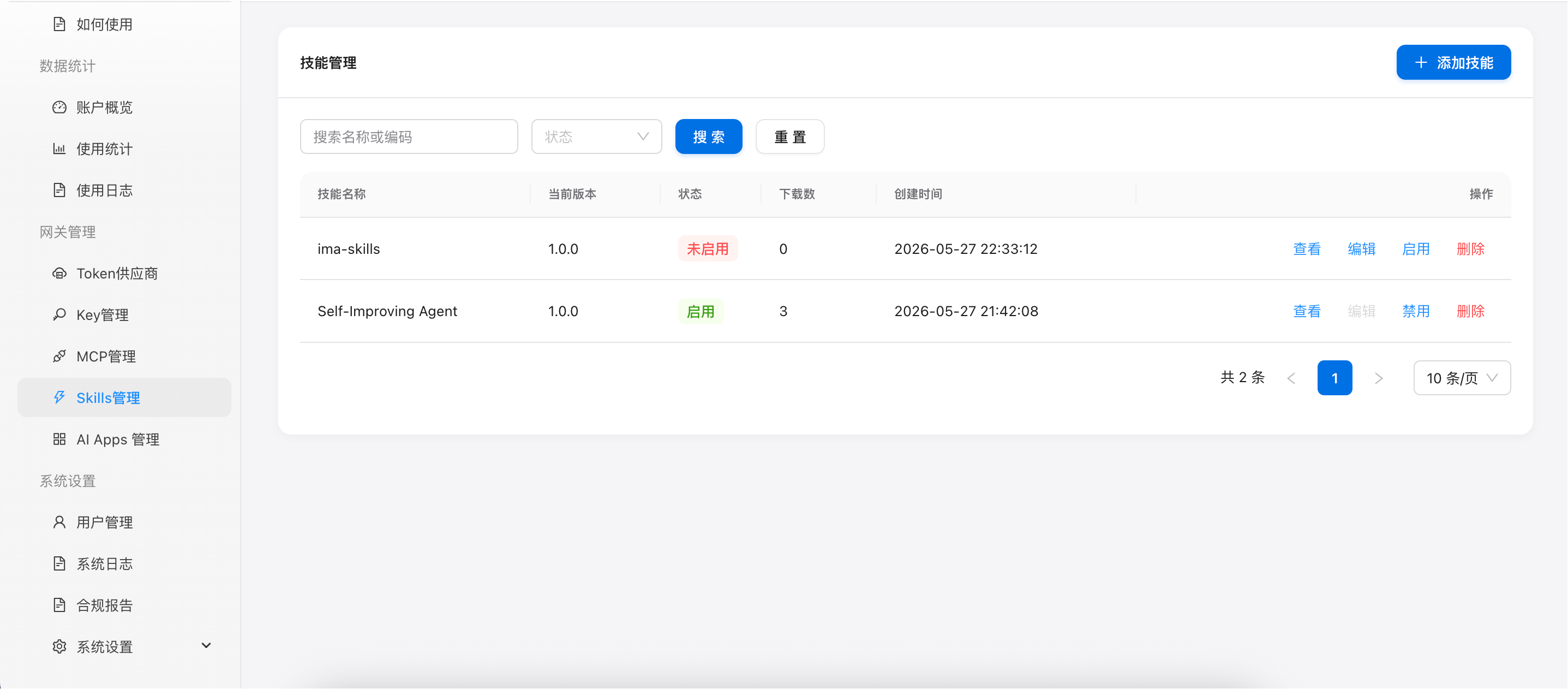
Figure 1: Skills Management List Page
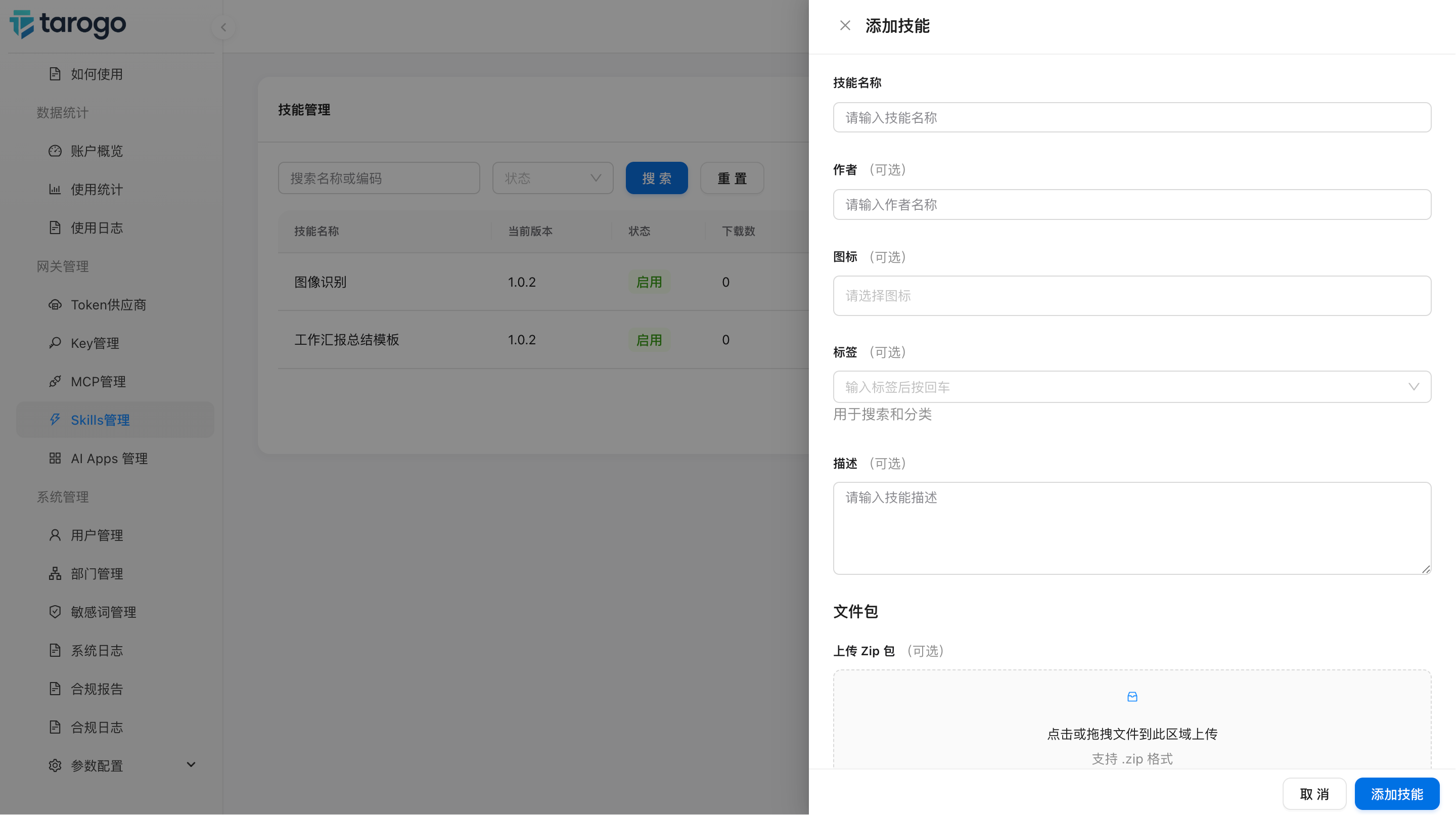
Figure 2: Create Skill Drawer Form (with tag selection and zip upload area)
Management & Maintenance
Published Skills can be maintained in the skill management list — enable/disable, edit/update, and delete.
Enable/Disable
Newly created Skills are disabled by default. They need to be manually enabled on the detail or list page to become visible to team members. Enabled Skills can be disabled at any time.
Edit & Update
Disabled Skills can be edited — modify basic info and upload a new package to publish a new version. Enabled Skills cannot be edited; they must be disabled first.
Delete
Unwanted Skills can be deleted. Deletion is irreversible. If a sub-Skill referenced by a workflow is deleted, the workflow execution will fail.
Tag Management
Skills are organized by tags rather than predefined types. Tags are managed by tenant_admin in System Settings → Other Configurations → Skill Tags.
The system comes with the following preset tags as a starting point. Admins can freely add or remove tags with no limitations on name length or quantity. When creating a Skill, select one or more tags for classification. Members can quickly filter and discover Skills by tags in the market.
Best Practices
- Naming: Skill names should be clear and concise, so team members understand the function at a glance, e.g., "Data Cleaning Assistant", "Email Template Generator"
- Descriptions: Clearly describe the use case, input requirements, and output format to lower the learning curve
- Versioning: Publish a new version for each update, reflect the change magnitude in the version number (Major.Minor.Patch)
- Security Review: Check that the Skill package does not contain sensitive information such as API Keys or passwords before publishing
Next Steps
After publishing, team members can discover and use Skills in the market.